
Track Genshin Impact Account Status in Your Browser
Overview
The software allows users to check their Genshin Impact account status directly within a web browser. Designed specifically for players who want real-time access to key account metrics such as current resin levels and daily commission progress. The tool functions as a browser extension, enabling seamless integration with the game’s official website or related platforms.
It is intended for casual and dedicated Genshin Impact players who value efficiency and convenience in managing in-game resources. The application helps users stay on top of time-sensitive activities, such as refreshing resin and completing daily tasks, without leaving their browser. This is particularly useful for players with multiple characters or those who manage several accounts.
Developed by Genshin Tools, the software operates without requiring game client modifications or third-party login credentials. The developer did not provide additional details about the company’s background or prior projects. The tool is distributed as a lightweight extension, making it easy to install and use across supported platforms.
Key Features & Capabilities
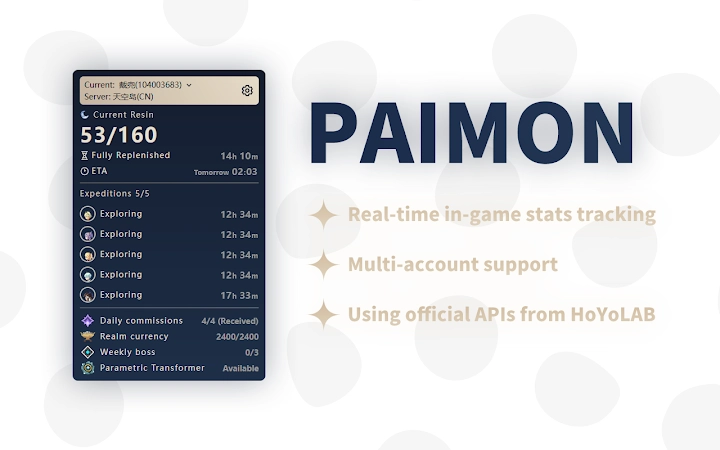
- Real-time resin tracking – Displays current resin levels and refresh times directly in the browser, helping players optimize their in-game activity schedule.
- Daily commission monitoring – Shows progress on daily quests and commissions, with visual indicators for completed and pending tasks.
- Browser-based access – Functions as a web extension, eliminating the need for a standalone desktop app or game client modifications.
- Lightweight design – Installed size is 1.2 MB, ensuring minimal impact on system performance and quick load times.
- Multi-platform support – Compatible with both Windows and Mac operating systems, providing consistent functionality across devices.
Users can access account data without launching the full game client. This is ideal for quick checks during breaks or while multitasking. The extension integrates with the official Genshin Impact website, ensuring data accuracy and reducing the risk of account bans. It does not store personal information, aligning with privacy-focused usage patterns.
User Interface, Workflow & Performance
The user interface is minimal and focused on essential data display. The extension appears as a small icon in the browser toolbar, which expands into a compact overlay when clicked. This overlay shows resin count, commission status, and refresh timers in a clean, readable layout.
Navigating the tool is intuitive. Users simply click the extension icon to view current account status. The workflow is streamlined for speed, with no setup or configuration required. The developer did not specify resource usage details, but the small file size suggests efficient operation. Performance observations are based on general software behavior patterns.
Stability appears consistent, as the tool operates within the browser environment without requiring system-level access. It does not interfere with other browser tabs or applications. No reported issues with crashes or freezes were mentioned in the provided information.
Compatibility & System Requirements
The software is compatible with Windows and Mac operating systems. It functions as a browser extension, meaning it relies on the host browser’s capabilities rather than native desktop integration. The installed size is 1.2 MB, indicating a lightweight footprint.
Exact system requirements were not listed. Compatibility information was partially provided, with no mention of specific CPU, RAM, or GPU specifications. The developer did not provide additional details about hardware or software prerequisites. Users should ensure their browser is up to date to maintain full functionality.
Pros and Cons
Pros
- Lightweight at only 1.2 MB
- Free to use with no hidden costs
- Real-time access to resin and daily commissions
- Browser-based, no installation required beyond extension
- Supports both Windows and Mac platforms
Cons
- Requires a browser to function
- Dependent on the official Genshin Impact website for data
- Exact performance impact not specified
- No advanced analytics or historical tracking features
- Limited to basic account status checks
FAQ Section
Is the software safe to use?
The tool operates as a browser extension and does not require login credentials or access to personal account data. It reads public information from the official Genshin Impact website, minimizing security risks.
Does it work offline?
No. The extension requires an active internet connection to fetch account status from the official website. It cannot function without a network connection.
How often does the data update?
Data is refreshed each time the extension is opened. The frequency depends on the user’s browsing behavior and the server response time from the official website.
Can I use it on multiple devices?
Yes, as long as the browser extension is installed on each device. The tool does not sync data across devices, so status will be checked independently on each system.
Is there a license or subscription required?
No. The software is completely free and does not require any license or subscription. It is available for permanent use without restrictions.
Final Thoughts
For Genshin Impact players seeking a simple, secure way to monitor resin and daily commissions, this browser extension delivers a focused and efficient solution. Its lightweight design and cross-platform support make it accessible to a broad audience. While it lacks advanced features, its core functionality is reliable and well-executed.
It is ideal for players who want to stay on top of in-game tasks without installing additional software. The absence of costs and complex setup enhances its appeal. For those managing multiple accounts or optimizing daily playtime, this tool offers a practical advantage.
Download Genshin Impact Account Tracker now.







